It has been a few months since Microsoft sent an update to Windows 11 users that contained a new version of notepad. The new version added features like tabbed documents and setting color schemes however myself and others also noticed that the word wrap feature defaults to “on” every time the application is open, and it appears that there isn’t an easy way use the new notepad without turning it off each time. Hopefully this will get fixed soon, but I am losing hope as each new month goes by without it being addressed.
A quick search online talks about multiple ways to work around the issue by removing app aliases so the classic notepad opens but for now the best solution I have found is to simply uninstall the new notepad which will default associated documents back to the classic version. The simplest way to do this is to remove it using the “optional features” menu but it can also be removed via powershell via this command:
Get-AppxPackage Microsoft.WindowsNotepad | Remove-AppxPackage
For a few folks reading this who are wondering why I wouldn’t simply use notepad++, the answer is that I most certainly do. The issue I run into with notepad++ is that it will cache all open documents to prevent work from being lost and in my case I may be making small edits to highly sensitive documents and would prefer the content not to survive once the application is closed so there is a real use case scenario for having both.
 May 3, 2023
  Comments (0)
Like so many folks out there I work remotely and rely on VPN to get me connected to customers. Since everyone has a different VPN server my laptop is unfortunately loaded with eight different software applications and has historically been a crapshoot with installing or upgrading. The punishment for installing an overly-invasive client might be going back to a restore point or potentially a full reinstall of Windows.
The last few years have been much better with Windows 10 becoming a mature product and software vendors writing to much stricter requirements that lessen the chance of one client breaking a system. For the last few years I have had no issues which got me a tad complacent and I didn’t think twice about using the latest and greatest version from each software vendor. I also wasn’t too concerned about Windows patches because they installed fine and machine always booted up fine.
A couple months ago I decided to get a new laptop during one of those super Black Friday sales and it came with the new Windows 11. I wasn’t too worried because I had my old laptop to fall back on in case things went sideways so my safety net was in place.
Once January 2022 rolled around, my old laptop had been sitting in a desk drawer for over a month and I was fairly certain I would not need to use it for anything. Patch Tuesday came along which changed everything however I wouldn’t realize what caused it for about a week.
I booted up the laptop the second week of January and everything was uneventful except for some strange glitch where all my Windows L2TP connections stopped working. My first thought was that some configuration changed on another VPN client and I had to dig around to figure out what it was and fix it. That took me down pandora’s box where I was resetting the winsock layer, deleting wan miniport drivers, uninstalling wifi adapters, changing IKE and IPSEC services, and anything else that could possibly work but my dismay nothing fixed it.
Like clockwork, one of the customers I have called me with an urgent situation, and to my embarrassment I was unable to connect. A lightbulb went off and I grabbed my old laptop and was up and running again and saved the day. The next day I continued to use the old laptop while spending hours trying everything I could think of to trace and identify what the problem is so I could go back to using a single laptop. I ended up finishing the project that evening and noticed a Windows update was telling me that it would install before shutdown. I didn’t think much of it and did the “Update and shut down” option not realizing the next day would be a problem.
The customer calls me up this morning and tells me that the code I wrote was cleared to go from testing to production and I casually reassured her that I would take care of it in a few minutes. I opened my trusty old laptop and connected up and what was working yesterday suddently fails with the exact same error message as the other machine
“The L2TP connection attempt failed because the security layer encountered a processing error during the initial negotiations with the remote computer”
Event viewer also had the same error as the new Windows 11 laptop:
“CoId={16127E81-095A-0000-F9F7-12165A09D801}: The user SYSTEM dialed a connection named {VPN NAME} which has failed. The error code returned on failure is 789.”
A lightbulb went off and I decided to uninstall the very last security patch in the system (KB5009543) and upon reboot I was ecstatic to find that I could once again connect! I can’t believe how many hours were wasted finding a solution to this only to find out that Microsoft deactivated the ability to use the L2TP VPN as a stop gap measure to stop a malware program that takes advantage of how it connects. I get why this fixing security vulnerabilities is important however deactivating the subsystem is akin to killing a fly a sledgehammer. The fly will be obliterated but so will the wall behind it.
Microsoft has now released patched KB5010795 which allows the VPN to function after you install and reboot. It is available through Windows Update or can be manually downloaded HERE
January 14, 2022
Comments (0)
These days I don’t do quite as many installs as in year past however do run into the scenario frequently where the client wants to get the shiny new software up and running on the newest iteration of the software but they are reluctant to drop a small fortune on Microsoft SQL Server licensing until they are certain the new version is a good fit for them. In some scenarios I have even seen where the customer already owned the supported version of SQL Server for the Syteline / Infor CloudSuite Industrial (or Business) that they need however that license is currently being used by the current production system and it would be a license violation to install this on the new system even though it was test.
Microsoft is quite generous and allows potential purchasers of their software to take a half year to kick the tires around. In some cases the client may even gain from waiting on purchasing the software in scenarios where the new SQL version is under six months from release allowing the current version to tide them over until they can buy the new one and invoke “downgrade rights.” On the surface this sounds like a no-lose scenario and in many cases this is very true. Microsoft even makes upgrading from evaluation to standard as simple as a very simply and non-invasive task that is available right from the disk known as an Edition Upgrade.
Now that we are aware of the benefits of enjoying an evaluation version it would be remiss if I didn’t cover the less glamorous aspects of using an evaluation edition. First, don’t trust your memory to keep track of when it was installed to make plans on licensing it later on. Microsoft SQL is not going to give you reminders each time you go to management studio that you have X days remaining nor will it give you a countdown when your time is running out. Instead, it will go from functioning as expected to crippled and there is no legitimate way to get a license extension from Microsoft that I have ever seen. What happens if your system is in production when the six months are up and nobody remembered to license the software? At the minimum you will see some unplanned downtime until someone gets their hands on a key. For some companies, each hour of downtime could be a small fortune and management will likely want to know who dropped the ball and in some cases terminate the person for negligence. One past thing to point out about this scenario is that the company doesn’t get much time to shop around for a reasonably priced seller and is often forced to pay full retail price plus a middle tier markup from the reseller. I have even seen cases where the company was so panicked that they went out and bought four packages of two core licensing when the server only had four cores and accidentally bought double what they should have because they would sign off on anything put in front of them if it meant they system was back online; Ouch!
There is a second aspect of going from evaluation edition to standard edition licensing that is even more sinister and could mean downtime even after proper standard edition licenses were applied. When the Configuration Wizard is used to create an initialized application or demo database and it is on evaluation version the logic is different than standard version. The wizard will query the back end server and will see that it has enterprise capabilities and will structure the entire database to use them. Is this a mistake on Infor’s part? Not at all! The evaluation edition is truly letting you evaluate the enterprise version so the wizard is correctly identifying that it has the ability to do an enterprise feature called “database partitioning” which will allow multiple sites to reside within one database however each site gets their own partition.
One might wonder why a partition would ever get created when the configuration wizard only created one site. The answer to this is that the wizard will see the enterprise features and make a business decision that the client will want to harness the power of database partitioning by allowing for future sites even though only one site was created. Now your database will have two partitions: The default partition and the partition that has been created for use by the site you defined in the wizard. Syteline / Infor CloudSuite Industrial (or business) still runs the same way and developers would still write their queries the same way because this is done on the back end not logic driven by user created stored procedures, functions, triggers, or views.
In cases such as the above where the wizard created a database of either of those two types, SQL now flags those databases as having the ability to only run in enterprise. After applying a license key and trying to start up the databases there may be a sinking feeling when one goes back into SQL Server Management Studio (SSMS) and sees those particular databases marked as “suspect.” The IT person may take a sigh of relief knowing that they have done their due diligence by backing up the databases nightly and determine that restoring the most recent backup will get them out of this nightmare. I have to be the bearer of bad news but unfortunately the database is not marked as suspect because somehow it got damaged during the edition upgrade but because the database was previously set to utilize enterprise features and the newly licensed database is now running the standard edition license which is not even a quarter of the price. Now what?
There really is only a few options once the database has enterprise features enabled system wide. The first option is to buy your way out of this by going back to Microsoft and trading in your standard license for enterprise. Your company better have a good amount of money to spend because these are expense. For most companies the cost alone makes this an unrealistic approach. The second approach involves creating a new database on the standard version and them standing up another evaluation version elsewhere and pumping over data via linked server. This solution can be very tough to accomplish because table order of the load is crucial to not violate foreign key constraints. Even when the table order is determined this would likely need to be done with triggers turned off or your data load would take in excess of a month! The last option is restore the database to an evaluation on another server briefly and then either manually or programatically remove the enterprise features until nothing is enabled and then back that up and restore it back to your SQL Standard instance.
That brings up an interesting question because we would need to know how many objects in the databases we would have to rebuild to accomplish this task. Taking a stock Syteline 9 ICS application database on 9.00.30 I did a query and found 3127 objects that would need to be rebuilt. Rebuilding by hand even one database sounds monumental and rebuilding the objects in multiple databases may be considered madness.
If you are running an evaluation edition of Microsoft SQL now you can run the following line on each database to determine which (if any) have enterprise features enabled:
SELECT *
FROM sys.dm_db_persisted_sku_features
If any records are displayed for any database and your evaluation edition hasn’t expired AND YOU DO NOT PLAN ON BUYING ENTERPRISE then this would be a good time to determine what path forward you want to take. There are many scripts on the internet regarding partitioning and I urge all people reading this to NOT BLINDLY RUN EVERYTHING THEY FIND OFF A WEBPAGE unless they understand what the script does and that its applicable to a SyteLine database. If you see scripts that refer to file groups and partition switching this is not a script that would get run to undo this type of partitioning.
I have written many scripts that I make available online to download and I have written ones specifically for putting a SyteLine 9 / ICS database back to a standard version that does not utilize partitioning however because of how dangerous it would be in the hands of someone who doesn’t fully understand the significance of each step I am opting not to make these available because of liability reasons. If you are reading this and have found yourself in a bad predicament please use the contact us form and someone will do our best to call or do a remote session to assist. For those that are proficient in T-SQL the high level steps would include the following:
- Alter the partition function to merge the range defined (found in sys.partition_range_values) The value will be general parameter record of the site
- Rebuild the clustered primary keys and clustered unique constraints
- Rebuild the non unique clustered keys
- Rebuild the non unique non clustered keys
- Rebuild the unique non clustered keys
- Rebuild the primary keys that are non clustered
- Drop the partition scheme (found in sys.partition_schemes) The default is SitePScheme
- Drop the partition function (found in sys.partition_functions) The default is SitePFunction
- Validate no enterprise features remain (select * from sys.dm_db_persisted_sku_features)
- Backup the database and restore it to the standard edition
I had one client ask me if there was a way to modify the behavior of the Configuration Wizard so that it will not create enterprise features for an evaluation edition so this could be avoided from the very beginning. The answer to that is “perhaps” but I have not spent any time looking for such a workaround. I had asked Infor a while back if there was a flag or other parameter that could be used for Configuration Wizard that would override the behavior but at the time was told that this is by design and that no override exists.
Hope this article was useful and will encourage clients to fully understand the implications of using trial software and to be prepared for when it comes time to activate it.
Tony Trus
August 22, 2016
Comments (0)
These days it is somewhat of a rarity working with a client who runs the Progress 4GL (AKA OpenEdge) version of the product. The majority of people seem to use the SQL based version of SyteLine because that is where all of the new features are added plus Microsoft SQL as a database engine is blazingly fast if properly cared for. Interestingly enough, the biggest reason I see the older versions still out there are because of internal resources who know this language construct very well and would find it a burden to both learn the new language and rewrite everything all over again in it. There is no definitive right or wrong stance on this however it’s worth pointing out that those who are entitled to software upgrades and don’t take advantage of it will not be able to take advantage of all the new features that keep getting added to the software.
I started at the very end of the 90’s performing software deployments, upgrades, migrations and everything else years before the SQL version came out so I had to familiarize myself with how to get this software to work within may disparate environments such as Linux/AIX/HPUX/SCO/BSD/Windows and one of the most frequent challenges every customer faced was getting various printers to work for a variety of reports.
In the early days, printing on impact printers were the norm and there were really two options: continuous feed perforated paper for 80 column and green bar for wide column. Fonts were for the most part fixed spaced and there really wasn’t a need to mess with font size because the paper was all designed for the default 10/12 point spacing. The 4GL versions of SyteLine consequently did not need to use the printing subsystem so the best choice was to make printing OS agnostic.
Because printing was so simple, Infor chose to use the PCL language construct to allow printing straight from the software to the device and then provided a way to embed various changes via a starting string and ending string. While not all printers are able to communicate via PCL the majority of business printers out there today still do making this technology still viable. With the cost of continuous feed paper and green bar increasing in price and the speed of modern laser printers getting faster with each year it makes sense for those who have not yet retired some of their impact printers to consider it as an option.
SyteLine start strings for PCL will always start via the escape code “~E” and will be followed by a sequence of alphanumeric code to send commands. There are many references online for PCL control codes but my goal is to go over just a few basic ones for those who are not familiar and then people reading this can add their own additional codes to suit their environment.
~E&l1O LANDSCAPE
~E&l0O PORTRAIT
~E(s16H SIXTEEN CHARACTERS PER INCH (replace 16 with 10,12,14,20 to make smaller or larger)
~E&a0L SET LEFT MARGIN 0 COLUMNS (increase from 0 to move margin right)
~E&l1E SET TOP MARGIN 1 LINE (increase from 1 to move margin down)
~E&l66P SET PAGE LENGTH TO 66 LINES PER PAGE (increase up or down)
~E&l1X PRINT 1 COPY (increase the value of 1 to desired number)
~E&l3A CHANGE PAPER SIZE TO LEGAL (2 for letter and 1 for executive)
~E&l8D PRINT 8 LINES PER INCH (increase up or down)
~EE RESET SETTINGS BACK TO DEFAULT (typically this is the SyteLine ending string)
Syteline does not provide unlimited room for adding codes via the start string however there is a way to shorten the start string so that more codes can be included. You can combine more than one command which start with the same two characters after the Escape by changing the last letter of the first part to lower case and leaving off subsequent two character prefixes:
~E&l1O~E&l66P~E&l2X can be shortened to ~E&l1o66p2X (note the ending character is left uppercase)
There are plenty of resources online for additional options such as specifying which paper tray should be used as input and which output tray the completed job ends up in. THIS SITE has plenty of useful information and downloads to help further specify PCL options. Spend some time in the SyteLine printer defaults on your test database to get everything to your liking and then deploy to production when ready. Good luck and hopefully some readers will now have the information needed to print like a pro.
December 24, 2015
Comments (0)
As an application engineer I find that there are certain circumstances where having a GUI screen to perform a task is not always possible/practical. There are many times that the client has given me access to the database server but not the application server and there are simply times I am going through upgrade steps and simply don’t have a working environment yet to perform tasks via the front end. This week I needed to perform a SyteLine 7 to SyteLine 9 upgrade that put me in such a situation and I had to get creative to find a workaround. For this customer one of the upgrade steps was to purge out all user scoped versions of forms from SyteLine 7 (not very many folks will spend time going through the process of FormSync and nor would I) however the newest version of FormSync was displaying nondescript errors on the delete operation. T-SQL to the rescue!
On a side note, I want to point out that I absolutely love what Infor has done with new SyteLine Infor CloudSuite and believe whole heartedly that no other company gives as much built in functionality for the cost per license. It is a very stable and mature product and it’s few and far between that I am forced to work around an obstacle from the back end. Secondly, I enjoy writing neat scripts to streamline my interaction with the ERP system and will almost always jump at the opportunity even when my plate is full.
For this task I wanted to whip up something that I could use in the future as part of the SQL cleanup process of removing user scoped forms automatically without having to ever open FormSync. My advice to everyone is to utilize the great tools that Infor provides to maintain your database health however I do realize that there are cases when fixing from the back end is a better route to go (assuming you know what you are doing and the logic is sound). As always I provide this “as is” and is meant for educating and not to replace functionality which is already available via the product.
Note: I wrapped the code in a BEGIN / ROLLBACK TRAN so that results can be viewed without actually causing true deletions of forms. When I ran it, I used a COMMIT TRAN instead so that it would really delete the unneeded form. Download Code Here
BEGIN TRAN

SET NOCOUNT ON
DECLARE
 @FormID INT
,@FormName nvarchar(50)
,@Scope INT

set @Scope = 3 --scope 1 for SITE, scope 2 for GROUP, scope 3 for USER
if @Scope < 1 or @Scope > 3
  RAISERROR('SCOPE MUST BE 1, 2 or 3',20,1) with LOG

DECLARE FormDelCur cursor local static for
SELECT Forms.ID, Forms.Name FROM Forms WHERE
  [ScopeType] = @Scope
  --AND [Name] = N'JobOrders'

open FormDelCur
fetch next from FormDelCur into @FormID, @FormName

while @@FETCH_STATUS = 0
BEGIN TRY
   DELETE FROM Forms WHERE ID = @FormID
   DELETE FROM FormEventHandlers WHERE FormID = @FormID
   DELETE FROM FormComponents WHERE FormID = @FormID
   DELETE FROM ActiveXComponentProperties WHERE FormID = @FormID
   DELETE FROM Variables WHERE FormID = @FormID
   DELETE FROM FormComponentDragDropEvents WHERE FormID = @FormID
   DELETE FROM DerivedFormOverrides WHERE FormID = @FormID
   DELETE FROM ActiveXScripts WHERE [Name] = @FormName AND [ScopeType] = @Scope
   DELETE FROM ActiveXScriptLines WHERE [ScriptName] = @FormName AND [ScopeType] = @Scope
   print 'Successfully deleted form ' + @FormName + ' with ' + CASE when @Scope = 1 then 'SITE SCOPE'
                                                                    when @Scope = 2 then 'GROUP SCOPE'
								    when @Scope = 3 then 'USER SCOPE'
							       END
   fetch next from FormDelCur into @FormID, @FormName
END TRY
BEGIN CATCH
   print 'Unable to delete form ' + @FormName + 'with ' + CASE when @Scope = 1 then 'SITE SCOPE'
                                                               when @Scope = 2 then 'GROUP SCOPE'
							       when @Scope = 3 then 'USER SCOPE'
							  END
   fetch next from FormDelCur into @FormID, @FormName
END CATCH
close FormDelCur
Deallocate FormDelCur
ROLLBACK TRAN
--COMMIT TRAN
December 4, 2015
Comments (0)
It’s not unusual to refresh the dev or test databases from time to time however there are occasions where a customer has a multi-site development environment where users on are actively making changes to some sites and not others. Recently I ran into this with a customer who has an environment with approximately 16 sites and they urgently needed one of the sites refreshed from a recent backup from live but would not be able to overwrite any other databases. I knew right away that transfer orders that weren’t complete would have issues with APS and already wrote code to address this and some other issues that I normally see however this customer happened to have hundreds of replication rule to/from this restored site and to make matters worse, a developer had accidentally added a treasure trove of UET fields to various tables in live without first testing the UET in development. You can be the farm that the developer was disciplined for bringing code straight into production but this doesn’t magically fix the fact that the database I restored into dev is throwing errors on many screens that reference the items table, the customer table, and a hand full of others that I knew about. It goes without saying that I most likely didn’t find all of them so I was faced with a few different options:
Option 1) Tell customer that the easiest thing (for myself) to do is to overwrite the other databases from copies of live so that they are in sync
Option 2) One by one wait for the UET mismatches to emerge and remove them from the newly restored database. The gamble would be that only a few total would be found. This could get annoying
Option 3) Compare the user_fld table of the old copy of the dev database to the newly restored copy (yes of course I backed it up first!) and identify and remove all differences
My original thought was to entertain option 3 because it gave a very clear cut look at every single UET that came over with live that wasn’t in there before restore. The query was simple and straightforward and in my scenario it returned 32 values. I then took a look at the table/class relationships and realized very quickly that a high percentage of the UET fields added were on tables that I was pretty sure did not play a role in replication. The last thing I want to do is waste time plucking out these fields when they will not likely throw an error when performing DML on the table.
I went back to the drawing board and decided that the best way to focus on UET fields that would affect replication was to focus first on replication rules that were enabled and tie them back to the tables that are part of that replication rule. For example, if Transfer Orders has 15 tables that it uses for replication then I would only want UET fields that have a table/class relationship that would be affected. In the case of this customer, there were a total of 5 UET fields out of 32 that I knew definitively needed to be dropped.
As usual I am sharing the code as a “work in progress” and it may or may not function in all environments. I have tested this in Syteline 8 and Syteline 9 (Infor Cloud Suite Industrial).
--what UETs are in source that are NOT in TARGET?

--the reason we don't compare user_fld directly is because it does not tell us if a replication rule is tied to it that is active.
--this method specifically targets the source/destination mismatches when there is a replication rule.
--ideal for removing UET's out of a newly restored db by comparing older copy to newer copy
--ideal for figuring out UET's to add as well!

--replace SOURCE_App with source (in my case the source database was the copy I took from live)
--replace TARGET_App with target (in my case the target database was the old copy from dev)

select reptables.object_name as [Source Table]
,      ucf.fld_name as [Source field]
,      TargetFields.TABLE_NAME as [Target Table]
,      TargetFields.COLUMN_NAME as [Target field]
from      (
select distinct replace(roc.object_name,'_all','') as [object_name]
from SOURCE_App..rep_rule            rr
join SOURCE_App..rep_object_category roc on rr.category = roc.category
where object_type = 1 and rr.disable_repl = 0) reptables
join      SOURCE_App..table_class          tc           on reptables.object_name = tc.table_name
join      SOURCE_App..user_class_fld       ucf          on tc.class_name = ucf.class_name
LEFT join (
	select schemacolumns.table_name
	,      schemacolumns.column_name
	from       TARGET_App.information_schema.columns schemacolumns
	INNER JOIN TARGET_App.information_schema.tables  schematables  on schematables.table_name = schemacolumns.table_name and schematables.table_type = 'BASE TABLE'
	)                                   TargetFields on reptables.object_name = TargetFields.table_name and ucf.fld_name = TargetFields.column_name
where TargetFields.TABLE_NAME IS NULL
June 30, 2015
Comments (0)
Whether its myself or some other person performing the installation/implementation of a SyteLine ERP system you can bet the farm that somewhere in conversation this table was mentioned as one that needs to be kept neat and orderly. Hopefully everyone has a SQL Agent job or Execute TSQ task in their maintenance plan that keeps this clean but it’s not always clear to customers as to how and why this table gets dirty and why the frequency of the task may not always be weekly but in many cases could be hourly (yes this is not a typo!).
Infor has meticulously thought out their SyteLine product very well to ensure that data going into their system has proper referential integrity and as a result there are fewer and fewer data scrubbings that now occur between version upgrades. For those that used to be on the Progress based versions of the software and then upgraded, there was a lot of clean-up. Job routings could easily exist for jobs that do not exist and item location records could exist for an item that did not exist.
Many of these issues were brilliantly resolved through check constraints, foreign keys, and cascading triggers so now there is little to no chance of duplication on critical values such as vendor numbers, customer numbers, order numbers, and invoice numbers. Now comes the fun part: ensuring that the next value for a particular sequence can be obtained quickly when a function is called to ask for the “next in sequence” value.
The idea behind NextKeys is actually quite brilliant and when the table is clean, functions can snap the current value for a particular table/column value with lightning speed without performing a table scan. SyteLine will both read the values from this table and also add more current values as they change but one thing it will not do is perform an automatic real time purge of old values each time a function requests the most current value. The reason it does not delete the value is not an oversight by the creators but a safeguard to ensure that this is performed outside of a nested transaction so that a record lock will not occur and also so that in the event the “next value” was not committed to the database it won’t skip over that value altogether.
Many customers will often ask why their NextKeys table grows so quickly and the stock answer I usually give is that the growth of NextKeys is dictated not only by frequency of the sequences changing by a human but also many developers will write mods that utilize NextKeys and can contribute massive amount of records to this table in short order via automated tasks.
There are two combinations of data that comprise NextKeys:
TableColumnName + KeyPrefix should be 100% distinct (no duplicates) and should have only the the most current KeyID present(assumes subkey is not present)
OR
TableColumnName + SubKey should be 100% distinct (no duplicates) and should have only the most current KeyID in the list (assumes KeyPrefix is not present)
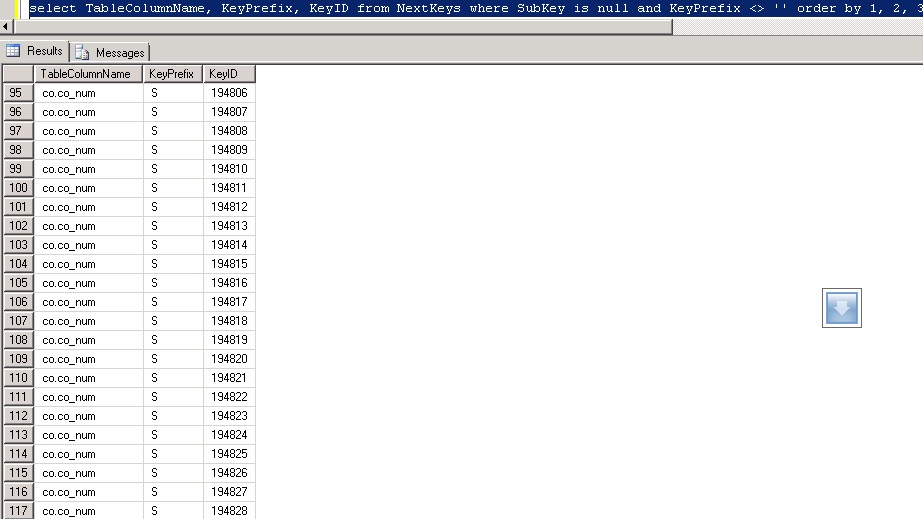
In the above example of an uncleaned NextKeys table you will see that co.co_num with KeyPrefix of S has many KeyID’s. There are 23 duplicates visible on the screen that after running PurgeNextKeysSp should leave one single record for this combination with a KeyID value of 194828.
Here is the same query after running the built in stored procedure to purge:
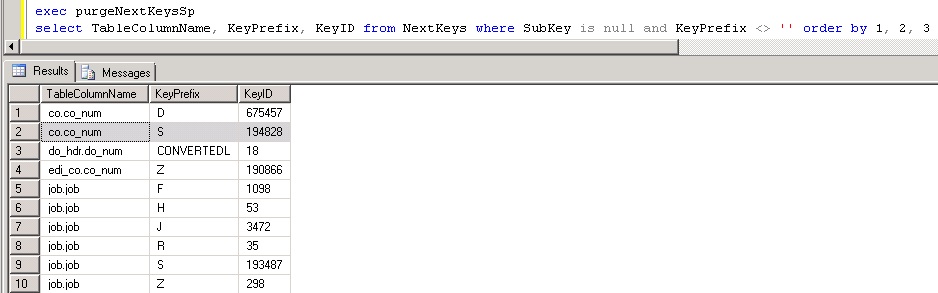
Notice how for each table/column key prefix there is only one KeyID that holds the most current (highest) value? This is what we want to see occur for performance reasons. Since this is a HEAP table, it’s especially important to keep it free of excessive clutter.
Product documentation describes the best practice of purging unneeded records from this as a nightly task. For most people I completely agree with this. There are some exceptions where mods that automate the insertion of records into this table will bloat it very quickly and for those customers who pass the threshold of over 2000 inserts per hour I would probably look into executing the PurgeNextKeysSp stored procedure multiple times per day and in some cases it may even be warranted hourly. For those who are worried about performing this task in the middle of the day, I would say that it would be highly unlikely for this task to take more than 5-10 seconds and it should not cause a disruption to users in the system like a reindex would cause on SQL Standard which forces many maintenance task to occur offline.
Something that really isn’t talked about too much is that NextKeys are 99.99999% correct for their values but there are certain circumstances where the current value on the NextKeys table is incorrect and desynchronized. It’s not that someone did something incorrectly in the system that caused it but likely a fluke hiccup resulting from the rare possibility of two getting and setting the NextKeys table at the exact split second and it causes the system to be report a usable next that truly is no longer available. I saw this more frequently in SyteLine 8.02 and earlier and not so much in 8.03 and newer. Infor has graciously provided a form called “Synchronize NextKeys” that will go through the process of finding the true value of what the NextKeys should be for each and every combination and assume all the values in this table could be incorrect. Depending on how many values are in this table it could take from a few seconds to many minutes to complete and should resolve error messages from SQL stating that it cannot insert a record because it already exists with that given combination.
The last nuance to discuss regarding the NextKeys table (and this is actually not specific to this table but any table that is a HEAP) is the bloat, forwarded records, and ghosted records that manifest itself and how to correct. Eventually I plan to make another article dedicated to this but for now I will simply provide a quick query to determine if the HEAP table suffers from this behavior HERE. Without going into too much detail you will not want to see any forwarded records, ghosted records or high fragmentation and if you see 10,000+ pages with only a couple hundred records it’s definitely bloated up. The fix for this only exists in SQL 2008 and newer and you would go into management studio and type
ALTER TABLE NextKeys REBUILD
After running that command you should be able to re-run the script to check it and see that everything is now clean, neat, and orderly.
Footnote for DBA’s:
For those of you who want to run the queries I ran to come up with the mathematical logic, here they are for your own curiosity:
select TableColumnName, KeyPrefix, KeyID from NextKeys where SubKey is null and KeyPrefix <> '' order by 1, 2, 3
 +
select TableColumnName, SubKey, KeyID from NextKeys where KeyPrefix = '' order by 1, 2, 3
 =
select count (*) from NextKeys
How many duplicate records can be found in NextKeys:
SELECT TableColumnName
    ,KeyPrefix [KeyPrefix or Subkey]
    ,count(*) TotalCount
FROM NextKeys
WHERE SubKey IS NULL
    AND KeyPrefix <> ''
GROUP BY TableColumnName
    ,KeyPrefix
HAVING count(*) > 1
UNION ALL
SELECT TableColumnName
    ,SubKey [KeyPrefix or Subkey]
    ,count(*) TotalCount
FROM NextKeys
WHERE KeyPrefix = ''
GROUP BY TableColumnName
    ,SubKey
HAVING count(*) > 1
ORDER BY 1
    ,2 ASC
December 31, 2013
Comments (0)
Its this time of year that my buddies in technology take a break from writing SSRS reports, doing forms development in Mongoose, and messing with ERP/EAM entirely and start thinking about all the November and December once a year releases of some of the finest American Whisky (Bourbon specifically) money can buy. Irish and other whiskeys (think Scotch) are plentiful and available all year long and as long as you have the money, you can likely go to any upscale liquor establishment after you leave the office or manufacturing plant and get a bottle to match your budget. Sadly, the same does not hold true for Bourbon and that’s why the holiday season is special in more ways than one can imagine.
Camping Out for Bourbon
Just as everyone was camping out for the new Xbox and the Playstation (these are apparently the hot ticket items at the time of writing this), the lines at the stores waiting for elite Bourbon would make folks think it was a line for the quarterly members only REI gear sale. Folks from all walks of life would camp out for the chance for a bottle but what makes this long line of customers so interesting is that its filled predominantly with folks in the top 5% income bracket. Those who scored with Pappy had bragging rights for at least a year and most folks will drink it slowly enough to make it last until next year’s rations. This isn’t just a top shelf bourbon; this is a private stash only type of bourbon that will only come out if the stakes are high.
In all fairness, I must say that this line of Bourbon has been dramatically hyped up to the level of consumer crazy that is rarely seen. There are other releases from the same manufacturer and others that also release this time of year that also never make it to the store shelves because they are bought up the second they arrive. I have no intention of mentioning names but those who follow the releases have a good idea of what other offerings are hot.
This year I was fairly busy with the release of Syteline 9 and going through a half dozen certifications on it and ION so I was fairly excited when I received an email out of the blue from Josh Hiebel from Saratoga Wine Exchange. While others had left work and were probably eating dinner or relaxing I hear the chime of Outlook telling me I have a new message and the title of it has peaked my interest!

Well here I am all excited because I am actually in front of my PC and see the email and immediately click the button to get on what I think is the waitlist. My thought was that I was going to be sitting pretty because I knew I was lightning fast to respond and get my name on that list before it became a wasted effort.
Truth be told I was expecting to not hear back for at least a day or two but to my surprise the owner of Saratoga Wine Exchange emailed me shortly after I thought I was putting myself on a waitlist. Rather than try and summarize it I thought I would simply share the reply that turned my evening from an exciting one to one that made my blood boil
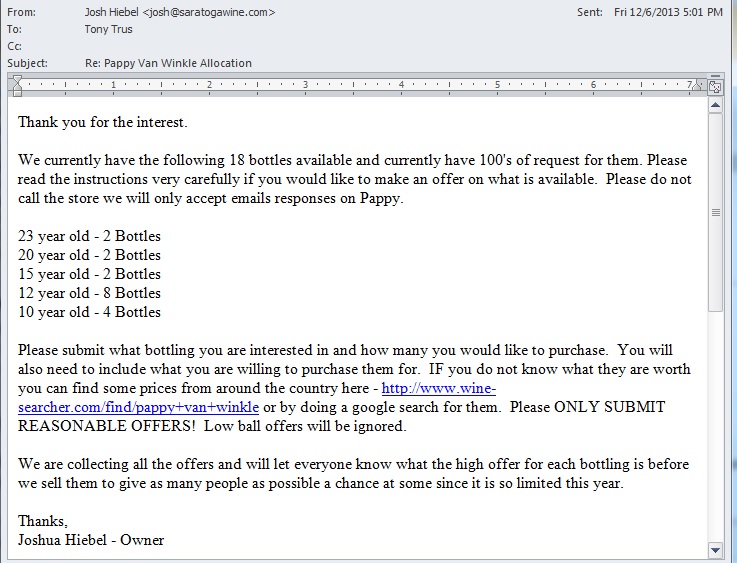
After seeing this, I knew that I fell hook line and sinker for the classic bait and switch. Somehow the crafty words on his original email that called it an “Allocation List” was strategically ambiguous enough to put readers in the mindset that this must mean waitlist. This follow-up email was the official kick off of an all out bidding war campaign where the ultimate winner is Joshua Hiebel and the losers are any potential buyers. This guy not only provides a search engine where you can search up results that only show private individuals selling this product at a huge markup but he does his customers one worse by announcing that he plans to revel the highest offer at the end of the silent bidding war so that people have a chance to pay an even higher premium for the product resulting in more profit to Joshua. Honestly I think folks would get a far better deal on Craigslist because at least you know that you are going to be paying a premium for the coveted spirit but you know that price upfront and either can opt to buy it or simply ignore.
Joshua did write me back indicating that he sincerely did not intend to alienate his prior customers but did say that we live in a capitalist society where it would be crazy not to try and get top dollar for his goods. What he does not get is that Buffalo Trace provides this yearly batch as a way to give a great bourbon at a reasonable price while still promoting their brand name for other product lines that are stocked on the shelf year round. Most of the legitimate places selling it also did not mark it up exponentially to score a huge profit because it was also a huge win for the stores because they got people going to their stores and buying other things and also walking away from the transaction feeling like that store is nothing short of awesome.
Living in Nashville, there was only one time I felt taken advantage of that badly and it was when there was an artificial gas crisis and fuel stations either didn’t have gas or they were selling it at double the price per gallon prior to the incident. If there is any difference between opportunistic price gouging for gas and having a retailer start a bidding war its certainly very small. They lost a customer that day but it still hasn’t soured my excitement for this time of year. In total I have stocked up on four other brands and the silver lining is that I did end up getting called for a true waitlist and was able to buy a 20 year old bottle for $139 which is just about what the retail price should be for this product. As they say, “All is well that ends well.” Hope you all have a happy and safe holiday season and look forward to some new cool tips, tweaks, and scripts in 2014.
Tony
December 18, 2013
Comments (0)
Years ago I remember playing with Virtual PC on my laptop and was absolutely amazed with the notion that I could run another operating system just as if it were another Windows application. The speed of the VM images were without a doubt lackluster on my laptop however it gave me hope that one day this would be perfected to a point where business could run multiple servers on one physical box in production.
After many years of hard work and development there are some great software packages on the market by VmWare and Citrix/Xen that virtualization has officially become the standard for deployment of production and development servers. This approach has some distinct advantages, and while it used to be the domain of the big boys like Fortune 500 companies with extensive IT resources, it is becoming common among SMBs as well. Advancing technologies in hardware and software has made it more straightforward to achieve virtualization, and it no longer requires a large IT staff to implement and support.
There can be some great advantages to using ERP applications like Syteline in a virtual server environment.
What is a Virtual Server?
The concept of server virtualization involves running guests instead of physical machines (computers or servers). In the usual (non-virtual) configuration, your computer or server runs one operating system (OS) that makes your computer work and thus a typical Syteline setup will require typically two to three servers. On a PC, it is probably Window XP or Windows 7, for a Mac it is named according to its revision like OS 9 or OSX. Server operating systems are not as well-known outside the IT industry, but Windows, Apple, and LINUX versions are common for servers as well.
In a virtual environment, a single machine has multiple operating systems installed on it, and this is invisible to the operating systems and its users. Each operating system thinks it is operating it own computer – running applications and managing inputs and outputs. Hence, you have several “virtual machines†operating on one single physical machine.
Virtual Software Creates Virtual Machines
Accomplishing this, however, requires special virtualization software that manages the physical machine allowing the various operating systems to run independently and allocating the computing resources to the various operating systems. This software is called the hypervisor or virtual machine manager (VMM).
VMware dominates the market for virtual server (VMM) software with its ESX and ESXi products, plus its Vsphere product focuses on virtualization in a cloud computing environment. Other significant players with virtualization software include:
- Microsoft Hyper-V and App-V
- Citrix Systems XenServer
- Oriole VM and VM VirtualBox
The Advantages of Virtualization
While some IT experts can go on forever about the virtues of virtualization, from a user and business standpoint there are a couple of critical reasons to consider virtualization:
Lower Operating Costs
Using virtualization, organizations can consolidate machines on fewer physical servers. Typically servers are highly underutilized and frequently operate at an average of 15% to 20% capacity. Excess capacity, in the form of expensive physical servers is used to deal with peak application usage that is rarely needed. With a virtual server approach, the same number of virtual servers can exist on much fewer physical servers while providing the same level of functionality and server utilization can be increased to about 80%. Fewer physical servers means less investment in hardware and less ongoing maintenance support.
Tune Operating Systems for Best Application Performance
By running several virtual machines on a single server instead, you can set operating system parameters and settings to suit particular applications and purposes without affecting other applications. Every application can have the OS configured for optimal performance, instead of compromised settings so that other applications installed on a server will run. You don’t need to have expensive separate servers for different applications in order to optimize performance.
Improve and Differentiate Security Settings
We all know that stringent security settings and security software can cause hassles and unforeseen problems. By running virtual machines you can use high security settings for applications or data that need it reduced security settings for applications or users that do not require more stringent security. This can reduce problems for both users and IT administrators while improving security.
Improve Uptime with Automatic Back-up
A virtual machine can divide up a single server into several virtual servers, however, a more practical approach virtualization provides is converting two or three physical servers into a larger group of virtual servers. Now if a physical server is down due to a hardware failure or maintenance, all of the operating systems, applications, and databases continue to function using the remaining servers. Having an automatic backup improves uptime while preventing the loss of data and the use of critical applications like Syteline.
Implementing Syteline in a Virtual Environment
The more complicated the application, the more difficult it can be to implement in a virtual environment. The popular ERP software Syteline can operate in a virtual environment, however some small and medium sized organizations without extensive IT resources hesitate to take advantage of using virtual servers because of the perceived risk. If they have a problem migrating the application to the virtual environment they risk losing the use of a critical application. Having Syteline unavailable for even a short time could be disastrous.
Don’t allow the lack of internal Syteline expertise or IT resources keep you from taking advantage of server virtualization benefits. Using a Syteline expert like Onepax can ensure the migration of Syteline to a virtual server is smooth and flawless. Plus they can help you:
– Optimize and tune Syteline
– Tune Syteline for SQL servers
If you are interesting in talking with a Syteline expert about virtualization or other Syteline needs, contact Onepax.
December 8, 2013
Comments (0)
Syteline ERP is an outstanding software application that empowers users to stay competitive in the manufacturing sector by offering a base product that is very powerful right out of the box and can be augmented by 3rd party modules for even more functionality. Most folks won’t argue that the licenses that enable the product and various other features are not exactly cheap but to Infor’s defense, they spent a fortune in time and money creating, supporting, and enhancing these applications with each version.
As a customer, you will want to have a general idea of how many users are truly working on the system to know whether or not you are close to needing to purchase more licenses (or boot out a few users). The System Administration Home screen provides a great bounce point to go into session management so you can see how many “Syteline Trans” licenses are being used but it will not readily provide the full picture or warn you when the licenses pool is dangerously close to being depleted.
Customers who opt for NAMED licenses have a bit of an easier time with understanding exactly how many of each module is in use because once the module(s) get assigned in the USERS/User Modules linked form they are instantly depleted. Concurrent licenses are a different story and allow overcommitting of modules to users and only hit their limits when the thresholds of logged in users who are assigned to that given module reach saturation. I really like concurrent module licensing over named because of this added benefit but it does come at a little bit of a premium in cost.
Wouldn’t it be nice to have a piece of transact sql (TSQL) code that could be used to gather this? Absolutely! Well the good news is that Infor does provide a stored procedure that will gather that number when called and with a little ingenuity, it can be called in loop to gather and display all modules. The original purpose of this script was to help a customer run it on demand so that they could take a few captures throughout the day and report to management as to how close they were to hitting their limits and also whether or not they should purchase more. I will provide the code below to execute this task on demand and leave it to you guys to tweak it to match your needs. Some thoughts that come to mind is a SQL Agent Job/Alert that takes the output of this script on a polled interval and emails one or more people in IT or management when they are within X number of licenses from saturation. This could also be turned into an event as well or it could employ additional logic to boot users out who have been logged in to the system over a certain timeframe.
How many syteline licenses am I using
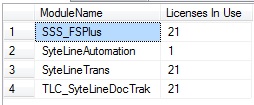 Licenses In Use Results Tab One question that folks who download this might be wondering is how to tell from this script alone how close they are to their limit. The quick answer to that question is that to the best of my ability I do not believe there is a way from TSQL code to get how many licenses of each module are purchased. The best advice I can give is to open up the form called License Administration and make note of the numbers there. You can optionally edit this script and populate another column in the temp table with those hardcoded values and perhaps add yet another column to calculate licenses left. Again, I left this as a general query so that you can use your imagination and make this into code that is useful given the requirements of your company. If anybody does happy to come up with a way to get the purchased license counts from a query please share with the community.
Update: A few users had asked whether or not this worked in multisite licensing where either the main site or the master site holds the licenses and passes the license tokens through the intranet. The answer to this is YES. Depending on how your multisite is set up this would either be run from the master or run from any one of the sites. The in use counts should reflect licenses for all sites regardless of where it was run from
December 7, 2013
Comments (0)
Next Page »
|